Loop Engineering Explained: How Modern AI Agents Actually Work
From prompt engineering to autonomous AI systems — understanding the execution loops that power modern AI agents.
Practical fixes, shipped as working code.
From prompt engineering to autonomous AI systems — understanding the execution loops that power modern AI agents.
AI has evolved far beyond answering prompts. Modern AI systems can write code, run tests, call APIs, review pull requests, and continue working toward a goal with minimal human intervention. The key difference isn’t a better prompt—it’s the execution loop that drives the agent.
While prompt engineering focuses on crafting better instructions, loop engineering focuses on designing the system that allows an AI agent to repeatedly reason, act, observe, verify, and decide whether to continue or stop.
This article explores what loop engineering is, why it’s becoming a foundational concept for autonomous AI systems, and how the same design principles appear across tools like Claude Code, Codex, LangChain, LangGraph, CrewAI, and custom agent implementations. Whether you’re building coding agents, workflow automations, or production AI systems, understanding the loop is becoming just as important as understanding the model itself.
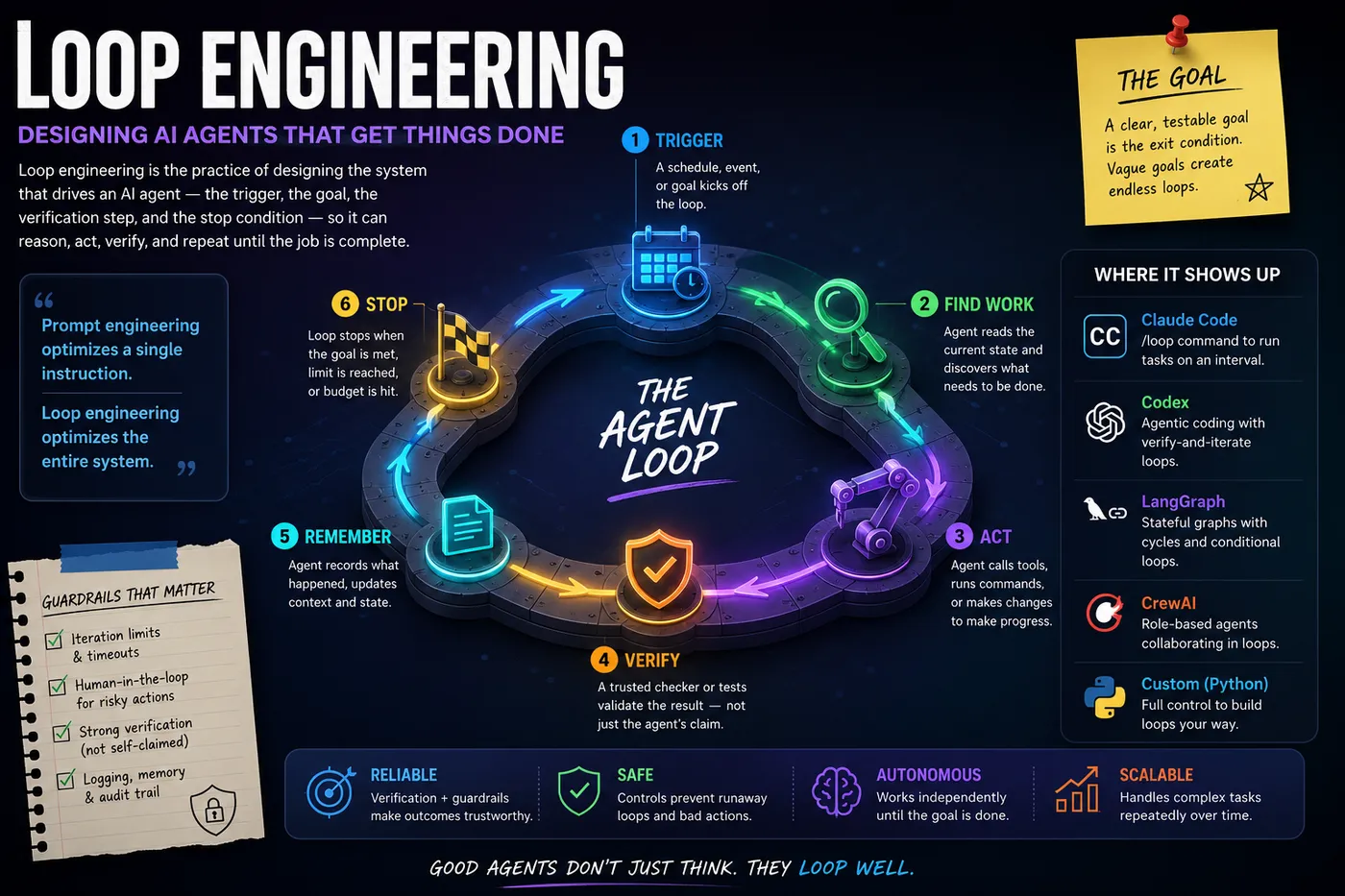
Loop engineering is the practice of designing the system that drives an AI agent — the trigger, the goal, the verification step, and the stop condition — instead of manually typing every prompt yourself. Simon Willison, who first popularized “agentic loops,” frames an agent simply as an LLM that runs tools in a loop to achieve a goal, and says “the art of using them well is to carefully design the tools and loop for them to use.” Where prompt engineering optimizes a single instruction, loop engineering optimizes the autonomous system around many instructions and decides when the system should stop.
The core cycle underlying every implementation — Claude Code, Codex, LangChain agents, or custom Python agents — is the same: reason, act, observe, repeat, until a stopping condition is met. On top of that basic ReAct-style loop (a pattern that dates back to 2022–23), loop engineering adds an “outer loop”: a system that decides on its own when it’s done, comes back only when something needs a human, and starts itself on a schedule or event rather than waiting for a person to type the next prompt.
Every well-engineered loop needs five core pieces, regardless of which tool executes it:
Without an explicit “done” signal, agents either loop forever or stop arbitrarily — vague goals like “make the app better” produce meaningless output, while specific, testable goals like “make all unit tests pass” give the loop a real exit condition.
Claude Code shipped a native /loop command (from version 2.1.71) that turns this theory into a one-line slash command: /loop [interval] <prompt>, where interval accepts seconds, minutes, hours, or days, and defaults to 10 minutes if omitted. Unlike a blind cron job, each iteration runs inside the live session with full access to prior context — files read, decisions made, changes already in progress — making it “a watchdog with a brain, not a blind script.”
Real examples used in practice include:
/loop 5m check if the staging deploy at localhost:3000 is responding — polls a deployment until it returns a 200 status and reports when it’s live./loop 15m check open PRs for new comments, summarize responses needed — babysits pull requests and can auto-fix builds when they fail./loop 30m detect merge conflicts between current branch and main — flags integration issues before a human has to look./loop every morning at 9:05 use Slack MCP to summarize mentions — a daily briefing loop tied to a fixed schedule rather than an interval./loop 20m /review-pr 1234 — runs a custom slash command (a UI-review sub-agent) repeatedly instead of a plain natural-language prompt.Claude Code loops are session-scoped (they stop if the terminal closes), support up to 50 tasks per session, and expire after 7 days by default — deliberately short-lived so a runaway loop doesn’t burn tokens indefinitely. Anthropic’s own guidance frames the simplest case as: ask Claude to build a feature, and it reads the code, makes the edit, runs the tests, and hands back a result it believes works — the reason-act-verify cycle in miniature.
OpenAI Codex and LangChain both support the same underlying pattern natively, even though they don’t use the identical /loop syntax as Claude Code. LangChain’s own framing — “the model calling tools in a loop until a task is complete” — is presented as “Loop 1: The Agent,” the most fundamental loop, with more complex agents built by stacking additional loops (an agent loop, a verification loop, an event loop, and an improvement loop) on top of it.
A common real-world Codex/Claude Code loop template, documented by independent tooling sites, looks like this for a CI-fix task:
Corrective RAG (CRAG) is another concrete, tool-agnostic example: search documents for a query, use the LLM to grade relevance, discard irrelevant context, optionally trigger a live web search if retrieval was weak, then aggregate and generate — a self-correcting loop that works identically whether the underlying model is Claude, GPT, or an open model.
| Loop type | Trigger | Best for | Example |
|---|---|---|---|
| Cron | Fixed schedule | Recurring, predictable checks | Daily dependency update scan, morning Slack digest |
| Hook | Event-driven | Reacting to a specific change | Run tests automatically when a PR opens or a log emits an ERROR |
| Goal | Open-ended, self-terminating | Multi-step tasks with a verifiable “done” state | ”Fix the failing CI checks with the smallest safe change,” stop when tests pass |
If a task can be reduced to a one-line shell command or check that returns pass/fail for “done,” it has a real exit condition and is a good loop candidate; if you can’t define that check, the task is probably better served by one well-crafted prompt. Good loop candidates share a common trait — a clear success criterion combined with tedious trial-and-error — such as debugging a failing test, performance tuning, dependency upgrades, or shrinking a container image. Judgment-heavy, one-shot, or creative tasks are the wrong fit for a loop.
LangGraph does not use a native while statement; instead, cycles are built with add_conditional_edges, where a router function inspects shared state and returns either the name of the node to repeat or END.
       from langgraph.graph import StateGraph, END
from typing import TypedDict

class State(TypedDict):
    counter: int

def increment(state):
    return {"counter": state["counter"] + 1}

def check(state):
    return {"done": state["counter"] >= 5}

builder = StateGraph(State)
builder.add_node("inc", increment)
builder.add_node("check", check)
builder.set_entry_point("inc")
builder.add_edge("inc", "check")
builder.add_conditional_edges(
    "check",
    lambda s: END if s["done"] else "inc",
    {"inc": "inc", END: END}
)
graph = builder.compile()
print(graph.invoke({"counter": 0}))
A closer analogue to an agent’s reason-act-verify loop replaces the counter with a draft/critique cycle:
       class State(TypedDict):
    task: str
    draft: str
    score: int

def reason(state):
    draft = f"{state['task']} — attempt {state['score']+1}"
    return {"draft": draft}

def critique(state):
    score = state["score"] + 1
    return {"score": score}

def should_continue(state):
    if state["score"] >= 3:
        return "final"
    return "reason"

def final(state):
    return {"draft": f"FINAL ANSWER: {state['draft']}"}

builder = StateGraph(State)
builder.add_node("reason", reason)
builder.add_node("critique", critique)
builder.add_node("final", final)
builder.set_entry_point("reason")
builder.add_edge("reason", "critique")
builder.add_conditional_edges(
    "critique", should_continue, {"reason": "reason", "final": "final"}
)
builder.add_edge("final", END)
graph = builder.compile()

result = graph.invoke({
    "task": "Write a concise definition of overfitting", "draft": "", "score": 0
}, config={"recursion_limit": 10})
Key design rules: always encode the exit condition directly in state (not in a separate variable), pass a recursion_limit in the invoke config as a hard iteration cap, log every iteration for auditability, and use checkpoints for long-running loops so state survives a crash or restart.
CrewAI’s Flow API builds loops using @start, @router, and @listen decorators. A router method inspects Pydantic-backed state and returns a string “event name”; @listen methods react to that event and can route back to the start, forming a retry loop with a max-iteration guard.
       import random
from crewai.flow.flow import Flow, listen, router, start
from pydantic import BaseModel

class ExampleState(BaseModel):
    success_flag: bool = False
    iteration: int = 0
    max_iterations: int = 5

class RouterFlow(Flow[ExampleState]):

    @start("start")
    def start_method(self):
        print("Starting the structured flow")
        self.state.success_flag = random.choice([True, False])
        return "next_step"

    @router(start_method)
    def second_method(self):
        if self.state.iteration >= self.state.max_iterations:
            return "end"
        if self.state.success_flag:
            return "success"
        else:
            return "failed"

    @listen("success")
    def third_method(self):
        self.state.iteration += 1
        self.state.success_flag = random.choice([True, False])

    @router(third_method)
    def third_router(self):
        return "start"

    @listen("failed")
    def fourth_method(self):
        self.state.iteration += 1
        self.state.success_flag = random.choice([True, False])
        return "next_step"

    @router(fourth_method)
    def fourth_router(self):
        return "start"

    @listen("end")
    def end_method(self):
        print(f"Ending the flow after {self.state.iteration} iterations.")

flow = RouterFlow()
flow.kickoff()
A simpler retry-counter pattern used in production code gates a @router on an attempts counter:
       class MyFlowState(BaseModel):
    retry_attempts_count: int = 0

class MyFlow(Flow[MyFlowState]):

    @start("try_again")
    def start_function(self):
        print("Start")

    @router(start_function)
    def check_attempts(self):
        if self.state.retry_attempts_count > 3:
            return "max_retry_exceeded"
        self.state.retry_attempts_count += 1
        return "try_again"

    @listen("max_retry_exceeded")
    def max_retry_exceeded_exit(self):
        print("Max retry count exceeded")
A practical gotcha reported repeatedly in CrewAI’s community: if a listener method and the event it emits share the same name, the Flow re-triggers itself and loops infinitely — always give methods and their emitted event strings distinct names.
       import os
from openai import OpenAI

client = OpenAI(api_key=os.getenv("OPENAI_API_KEY"))

def agent_loop(goal: str, max_iterations: int = 5):
    context = [{"role": "system", "content": "You are an autonomous agent. Use thought/action/observation loops."}]
    context.append({"role": "user", "content": goal})

    for i in range(max_iterations):
        response = client.chat.completions.create(model="gpt-4o", messages=context)
        thought_and_action = response.choices[0].message.content

        # Parse thought_and_action for a tool call in production; simplified here
        observation = "Tool execution result placeholder"

        context.append({"role": "assistant", "content": thought_and_action})
        context.append({"role": "user", "content": f"Observation: {observation}"})

        if "Final Answer:" in thought_and_action:
            break

    return thought_and_action

result = agent_loop("Research the current price of Bitcoin and compare it to 2025 averages.")
Three production hardening steps: stream tokens so a UI can show progress, cap token usage at the start of every iteration, and log every iteration to a structured store for later audit.
| Framework | Loop mechanism | Exit condition pattern | Best fit |
|---|---|---|---|
| LangGraph | add_conditional_edges routing back to a node | Boolean/counter in typed state, checked by router function, plus a hard recursion_limit | Multi-node workflows needing visual graphs, checkpointing, and complex branching |
| CrewAI Flows | @router + @listen decorators emitting event strings | Counter or flag field on a Pydantic state model, checked inside the router method | Teams already using CrewAI crews who want lightweight event-driven orchestration on top |
| Custom Python | Plain for/while loop appending to a message list | Explicit sentinel string (e.g., “Final Answer:”) or max_iterations counter | Full control, minimal dependencies, or embedding a loop inside an existing service |
Across all three, the non-negotiable elements repeat: an explicit exit condition stored in state, a hard iteration or recursion cap, and iteration-level logging — the same guardrails Claude Code’s /loop and Codex-style agent loops enforce at the product level.
As AI systems become increasingly autonomous, the engineering challenge is shifting from writing better prompts to building better execution systems.
Reliable agents aren’t defined by the language model they use—they’re defined by the loops around that model: how they discover work, call tools, verify outcomes, preserve context, recover from failures, and know when to stop.
Whether you’re using Claude Code, Codex, LangGraph, CrewAI, or your own custom framework, the underlying principles remain remarkably consistent. Strong loop design leads to more reliable, predictable, and trustworthy AI systems.
Prompt engineering isn’t going away—but it’s no longer the whole story. For anyone building the next generation of AI applications, loop engineering is quickly becoming a core software engineering discipline.
 AI Automation
 Explore how the deepening integration of AI and machine learning is powering the next wave of enterprise automation, including strategic frameworks, emerging tools, and governance best practices.
 AI Automation
 Discover 10 powerful AI agent use cases built on n8n, from meeting managers to compliance auditors, that save time and cut busywork.